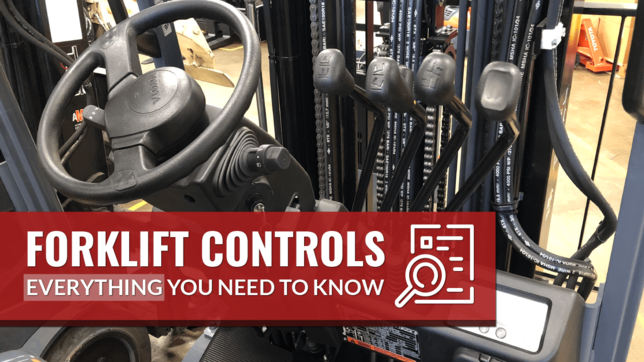
Forklift controls are the devices and mechanisms that allow an operator to drive, steer, lift, and maneuver a forklift. They include the pedals, steering wheel, directional controls, and hydraulic levers that move the forks and mast.
Understanding these basic forklift controls is essential for any forklift operator to operate the vehicle safely and efficiently.
Let’s dive in
Basic Forklift Controls
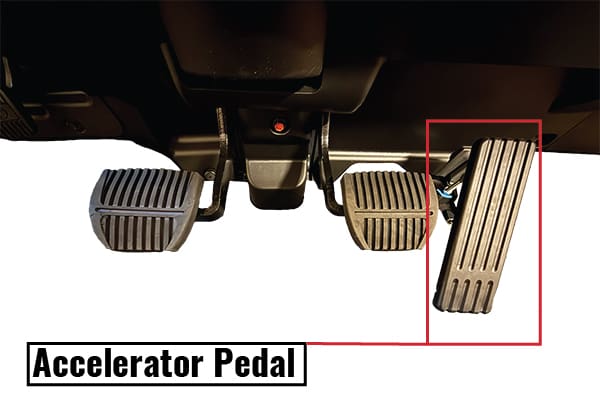
Accelerator Pedal (Gas Pedal)
The accelerator pedal (or “gas pedal”) controls the speed of the forklift, similar to a car’s accelerator. Pressing it feeds fuel or power to the engine or motor, making the forklift move faster, while releasing it slows the forklift down.
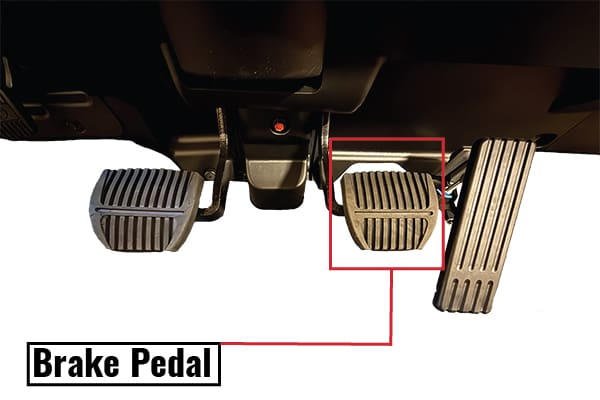
Brake Pedal (Service Brake)
The brake pedal, also like in a car, slows or stops the forklift when pressed. This is the service brake used during operation.
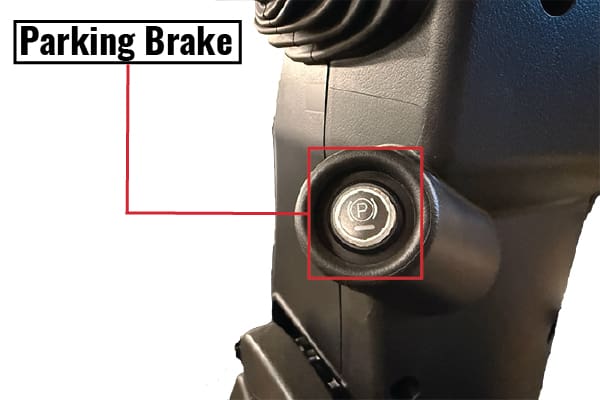
Parking Brake
In addition, forklifts are equipped with a parking brake to hold the truck in place when parked. The parking brake is often a hand lever or button near the steering column or a pedal that you press to set and lock. Always set the parking brake when the forklift is stationary or when parking, as an extra safety precaution.
Steering Wheel and Steering Column
Most forklift trucks have a steering wheel just like a car’s, typically with a spinner knob for easy one-handed turning. However, forklifts use rear-wheel steering – the back wheels turn, not the front. This allows a tight turning radius in tight spaces. Be aware that when you turn the steering wheel sharply, the forklift’s rear end swings outward due to the rear steering pivot. Always check for obstacles or people in the swing path.
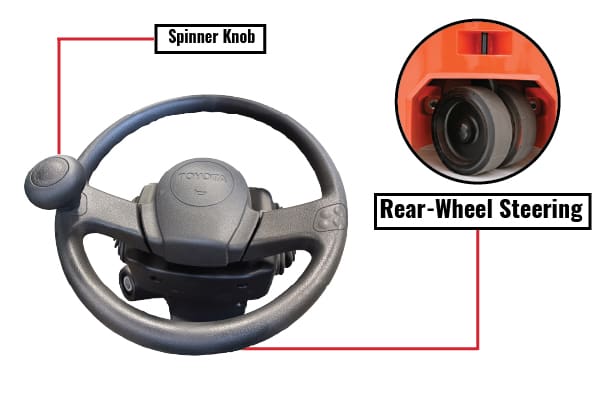
The steering column may also have other controls mounted on it (like a directional lever or light switches), depending on the model.
Two Pedals vs. Three Pedals
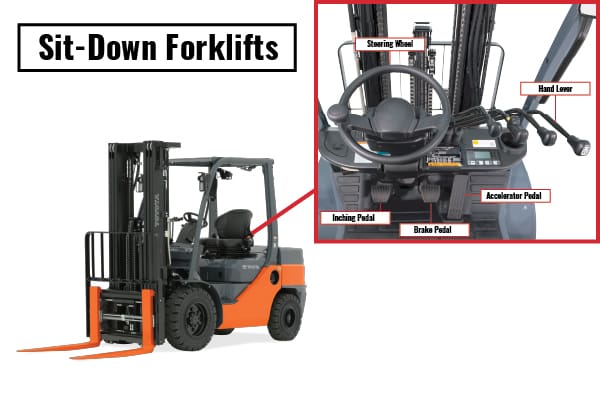
Different forklift models have varying pedal configurations. Electric sit-down forklifts often have two pedals: an accelerator and a service brake (with a hand-operated parking brake on the side). Internal combustion (gas or diesel) forklifts frequently have three pedals: accelerator, brake, and an inching pedal (also called a clutch pedal).
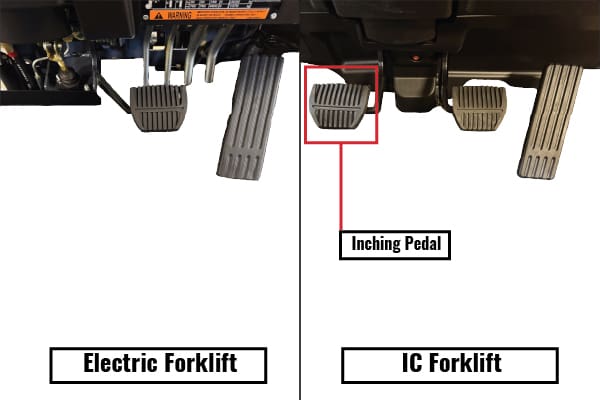
The inching pedal lets you disengage the transmission to creep slowly without fully braking – effectively acting like a clutch for precise control. By pressing the inching pedal, you can rev the engine with the accelerator to power the hydraulics (lifting or tilting) without the forklift moving forward. This is very helpful for raising heavy loads smoothly, as it allows more engine power to the hydraulic pump while keeping travel speed in check.
Not all forklifts have a separate inching or clutch pedal – most forklifts with automatic transmissions will instead allow low-speed control by feathering the brake and throttle.
Shift Lever (Forward and Reverse)
Forklifts do not have a multi-gear transmission like cars. Instead, they have a directional control or shift lever to select forward, neutral, or reverse. This lever is often mounted on the steering column or to the side of the steering wheel. Moving the lever forward puts the forklift in forward gear, and moving it back engages reverse.
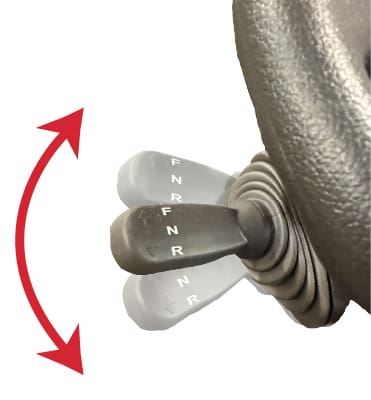
You typically select the direction with this lever, then use the accelerator pedal to move. Always come to a complete stop before switching from forward to reverse (or vice versa) to avoid damaging the transmission. Use the directional control along with your mirrors and look over your shoulder when reversing to operate the forklift safely.
Hydraulic Controls and Functions
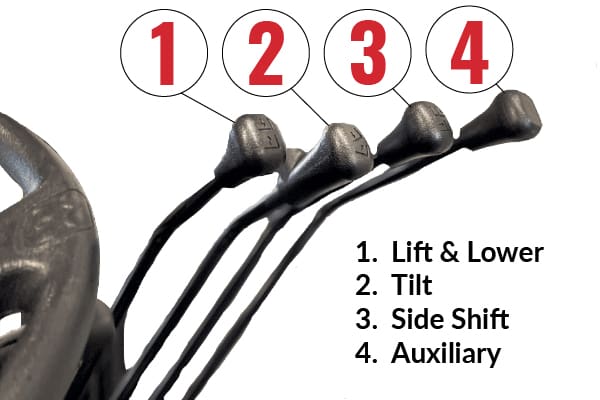
Forklifts use hydraulic controls to lift, lower, and tilt loads. These controls usually come in the form of one or more levers (or sometimes joystick controls on newer models) next to the operator’s seat. When you move a hydraulic control lever, it opens a valve to direct hydraulic fluid through hydraulic hoses, activating a cylinder that moves the forklift’s mast or attachment. Before each use, it’s wise to visually inspect the hydraulic hoses for leaks or damage and check hydraulic fluid levels as part of routine maintenance.
Lift Lever
Most forklifts have a set of at least three basic hydraulic function levers. The primary lever controls the raise and lower function of the forks (or mast). Pulling this lever back pumps fluid to lift the forks up, and pushing it forward lowers the forks down.
Tilt Lever
The second common lever is the tilt lever, which controls the mast’s tilt angle. Pulling the tilt lever back will tilt the mast backward (bringing the forks up and back), and pushing it forward will tilt the mast forward. Tilting back is used to stabilize a load against the backrest, especially after picking up a load, so that it rests securely and doesn’t slide off. Tilting forward is used to level the forks or to deposit a load.
Side Shift Lever
A common third lever controls an auxiliary function like side-shift, which moves the fork carriage left or right to adjust the load position without moving the whole truck.
Auxiliary Lever
Other attachments (such as clamp or rotator attachments) may use extra fourth levers to operate those specific functions. For example, a paper roll clamp attachment might have extra levers to rotate or clamp/unclamp the load. The exact layout of hydraulic control levers can vary, but most forklifts clearly label each lever’s function.
Forklift Controls by Forklift Model
Not all forklifts have identical controls. Different forklift models and designs can have unique control layouts, though the basic functions remain consistent. It’s important for the forklift operator to always check the operator’s manual and get familiar with a specific forklift’s controls before use. Here’s how controls can differ between 4 common types:
Sit-Down Forklifts
These are the standard forklifts where the operator sits (typically used in warehouses or outdoor yards). Sit-down forklifts generally have the full set of automobile-like controls: a steering wheel, accelerator and brake pedals (and often an inching pedal on fuel-powered units), and hand levers for hydraulic functions.
Stand-Up Forklifts
Stand-up forklifts (such as stand-up counterbalance forklifts and reach trucks) are operated while standing in an open operator compartment. Instead of a traditional steering wheel, many stand up forklifts use a steering tiller or smaller wheel, and they often have a single multifunction control lever (joystick) for travel and hydraulic functions. For example, in some stand-up reach trucks, pushing the joystick one direction makes the truck drive forward or reverse, while other motions or twist grips on the same handle control lifting and tilting of the forks. This allows the operator to control the machine with one hand and minimizes the space taken up by controls – useful in narrow aisles.
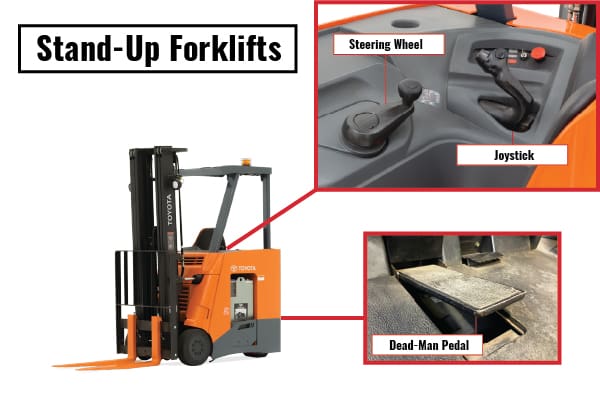
Stand-up models also typically have a “dead-man” pedal on the floor that must be depressed for the truck to operate (releasing it will cut power and act as an emergency brake). Because stand-up operators frequently mount and dismount the truck, these forklifts are common in environments like warehouses where the operator might need to pick orders.
Order Picker
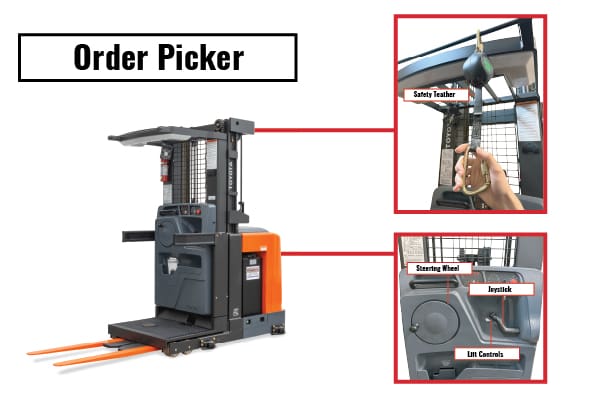
An order picker forklift (which elevates the operator with the load) will have similar controls as a stand-up forklift with two major differences.
- Order pickers often use a tethered dead-man switch or a twist grip for travel instead of the dead-man pedal.
- The lift function for an order picker lifts the operator platform instead of just the forks.
Hand Controlled Riders
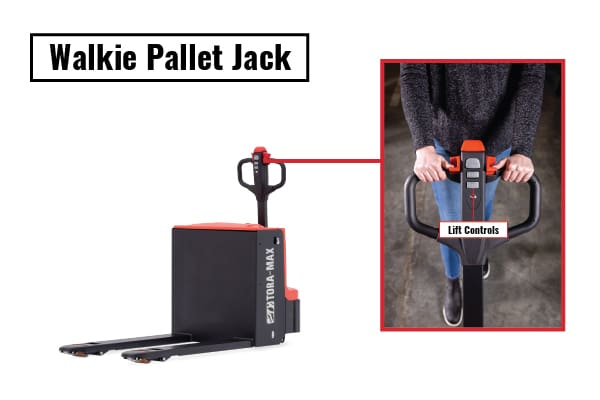
A hand controlled rider like a walkie pallet jack is steered by a tiller arm and has simple buttons for lifting and lowering the forks.
Despite these differences, most forklifts share the core control principles: you always have a way to accelerate, brake, steer, shift direction, and operate the lifting mechanisms. Whenever you switch to a different model, take time to locate each control (pedals, levers, switches) and understand its function.
Forklift Safety Features and Warning Systems
Modern forklifts come equipped with various safety features and warning systems to help prevent accidents and alert the operator to potential issues. As an operator, you should be familiar with these features and use them properly:
Operator Restraints and Guards
Most forklifts have a seat belt or operator restraint system – always buckle up on a sit-down forklift. There’s also an overhead guard (a metal roof-like cage) designed to protect the operator from falling objects.
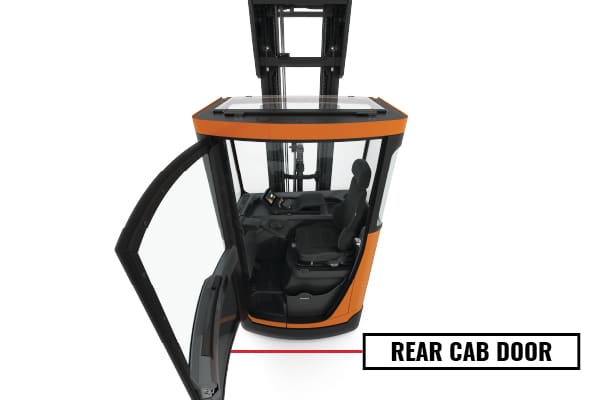
These physical safety features are your last line of defense in a mishap.
Warning Lights and Alarms
Forklifts typically have warning lights on the instrument panel (dashboard) similar to a car: for example, engine temperature, low oil pressure, battery charge level, etc. If a warning light or audible alarm comes on, do not ignore it. These alerts can signal problems like overheating, low hydraulic fluid, or other mechanical issues that need attention.
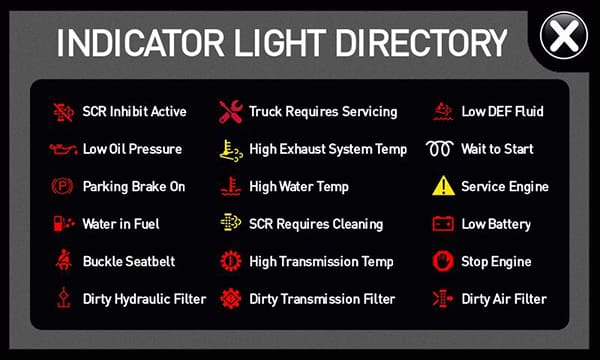
Ignoring warning lights can lead to a breakdown or even an unsafe situation. In addition to internal indicators, many forklifts are fitted with external warning devices: flashing beacon lights or strobe lights to enhance visibility, backup alarms that sound when reverse is engaged, and even blue or red spotlight projectors that cast a bright light on the ground ahead or behind to warn pedestrians of an approaching forklift.
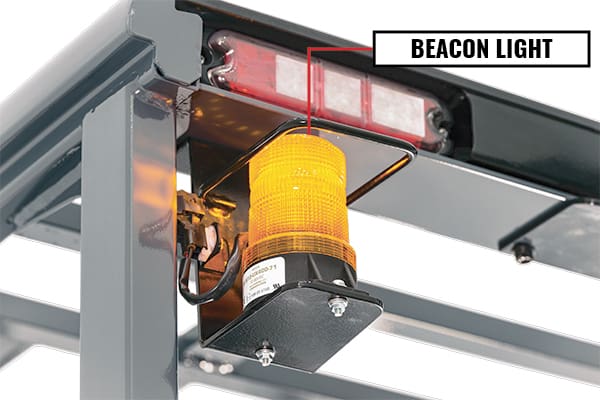
As an operator, make sure these safety features are functioning – check that the lights come on and the alarm sounds. Use your horn as an additional warning to others, and always be aware of workplace hazards around you.
Safety Switches and Controls
Some forklifts have built-in safety interlocks. For example, many sit-down forklifts have a seat switch that only allows operation when someone is seated, and will shut off the engine if you get up.
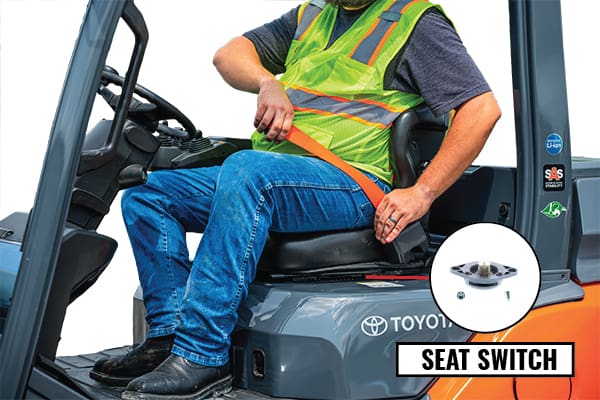
Stand-up forklifts often have a dead-man pedal or dead-man switch that cuts power if you step off or lift your foot. Newer forklifts might have stability control systems that automatically limit speed during sharp turns or limit how high you can lift a load when the mast is tilted forward.
There are also tilt indicators, load weight sensors, and other modern innovations to keep operations safe. Be familiar with any such systems on your forklift. They are there to assist you, but never rely solely on them – proper operating habits are the best prevention for accidents.
Workplace Hazards and Visibility
Even with all the forklift’s built-in safety features, the operator must remain vigilant about workplace hazards. Always ensure you have a clear view in the direction of travel – use mirrors and look over your shoulder when needed, and if a load blocks your view, drive in reverse or get a spotter.
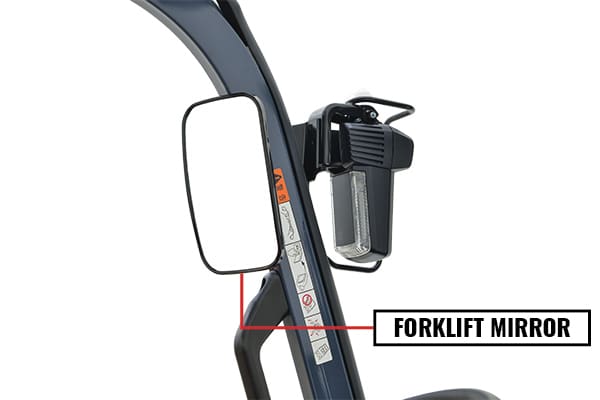
Use the forklift’s lights in dim areas or at night to see and be seen. Avoid distractions; focus on the task and area around you. Remember that pedestrians often don’t realize how quickly a forklift can appear; make eye contact with people nearby and use hand signals or the horn to communicate.
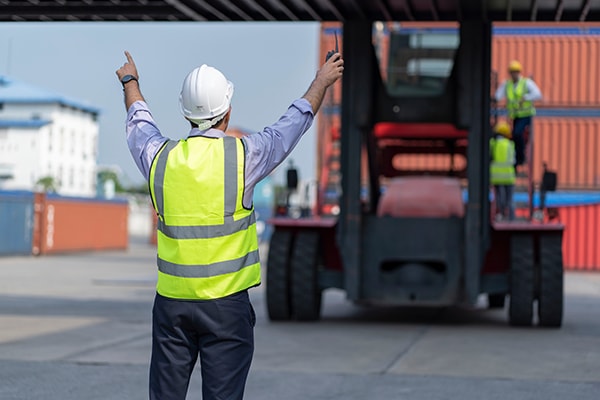
Combining these practices with the forklift’s warning systems (lights, alarms, horn) greatly reduces risk and helps prevent accidents.
Conclusion
Forklift controls may seem straightforward at first, but mastering them is critical to safe, efficient operation. From pedals and steering to hydraulic levers and directional controls, every component plays a specific role in how a forklift moves, lifts, and handles loads. While control layouts can vary between sit-down forklifts, stand-up models, order pickers, and hand-controlled riders, the core operating principles remain the same.
Understanding how each control functions—and how they work together—helps operators maintain stability, protect loads, and avoid workplace hazards. Just as important is recognizing and using built-in safety features such as warning systems, restraints, and interlocks, which are designed to reduce risk when used properly.
Before operating any forklift, always take time to familiarize yourself with that specific model’s controls, review the operator’s manual, and follow proper training and safety procedures. A well-informed operator is not only more productive but also far less likely to cause accidents, damage equipment, or put others at risk. In forklift operation, knowledge and attention to detail are just as important as skill behind the controls.